I’ve audited a lot of ad accounts for course creators. eLearning brands, cohort programs, certification schools, the works. And I’ll tell you something I’ve said for years, completely seriously: I’ve never met one whose conversion tracking was perfect. Not one.
That’s not an insult. It’s a technical thing, and it’s genuinely hard for non-technical people to get right. A pixel fired once during launch week, somebody saw a “1” show up in the conversions column, and everyone moved on assuming the foundation was solid. It usually isn’t.
Here’s what this piece gives you. One 5-minute test that tells you whether your numbers are lying to you right now. The handful of reasons course-business tracking quietly breaks. And the 3 things worth measuring instead of the 20 you’re probably staring at. If your tracking is off, every other decision you make on top of it is built on sand, so this is the thing to fix before you touch a bid or a budget.
Conversion tracking for online course businesses has its own failure modes, ones that don’t show up for an ecommerce store. We’ll get to those. Start with what “set up” actually means.
“It’s set up” usually means a pixel fires once. That’s not tracking.
When a course creator tells me their tracking is set up, they almost always mean one thing: there’s a conversion action in the account, and once in a while a number appears in it. Maybe it says “form submission.” Maybe it says “lead.” Once a week it ticks up by one or two.
That’s a pixel firing. It is not conversion tracking.
Proper conversion tracking means a few specific things are true at once. Your enrollment or lead event fires reliably, every time, on the right action. It carries a value, passed dynamically, not a flat number you typed in once. It deduplicates, so a refresh or a back-button doesn’t get counted as a second sale. And it actually reaches Google, which sounds obvious until you learn how often it doesn’t.
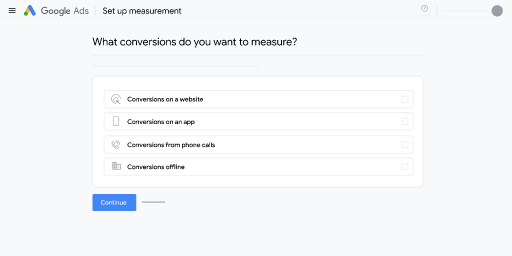
So what does “complete” look like? Here’s the simplest definition I can give you, and it’s the one to answer early because everything else hangs off it: your tracking is working when Google’s reported number matches your real enrollments in the backend within roughly 10% on volume. If Google says 100 enrollments and your platform shows 95 to 105, you’re in good shape. If Google says 100 and your backend shows 60, you don’t have tracking. You have a number that feels like tracking.
The reason this matters goes deeper than reporting. Smart Bidding, audience targeting, the creative-matching machine, all of it can only ever be as good as the signal you feed it. The better the signals you send Google, the better the result. Simple as that. Feed it garbage and the algorithm optimizes hard toward the wrong thing. Bad tracking doesn’t just give you a wrong report. It actively steers the bidding engine off a cliff while you watch the spend climb.
The 5-minute test: does Google’s number match your enrollments?
You can run this yourself this afternoon. You don’t need a developer, and you don’t need us.
Pick a clean date range. Last 30 days works. Pull two numbers.
- Open Google Ads. Look at the total conversions for your main enrollment or lead action over that range.
- Open your real source of truth: your course platform, your CRM, your Stripe dashboard, your enrollment database. Count the actual enrollments (or qualified leads, if that’s what you’re optimizing toward) from paid traffic over the same window.
Now compare.
- If the two numbers are within about 10% of each other on count, your volume tracking is probably healthy.
- If they diverge by more than 10% on count, or more than 15% on value, your tracking is broken. Not “needs a tweak.” Broken.
I want to be clear about the direction, because it cuts both ways. If Google’s number is lower than your backend, you’re under-counting, which usually means conversions never reached Google and you’re throttling the algorithm by starving it of data. If Google’s number is higher than your backend, you’re over-counting, which is often worse, because the algorithm is confidently chasing sales that never happened.
Run the test on value too, not just count. A course business that sells a $200 mini-course and a $4,000 flagship program cannot survive on counting “an enrollment is an enrollment.” If Google’s reported revenue is off from your real revenue by more than 15%, the value signal is wrong even if the count looks fine.
Five minutes. Two numbers. It’s the fastest read on whether the rest of your account is being optimized on truth or on fiction.
Why course-business tracking breaks (and you don’t notice)
The cruel part is that broken tracking looks fine from the dashboard. The numbers still move. The charts still go up and to the right some weeks. Nothing flashes red. Here are the usual culprits, in roughly the order I find them.
The thank-you page gets refreshed (the Transaction ID problem)
This is the single most common reason Google’s count blows past your real one. Your enrollment fires on the thank-you page. Someone enrolls, lands on that page, then refreshes it, or bookmarks it, or hits the back button and comes forward again. Every one of those is counted as a brand-new enrollment.
The fix is a Transaction ID: a unique, system-generated string attached to each real enrollment, so Google counts only the first fire per ID and ignores the duplicates. Without it, every refresh is a fake sale. I’ve seen this exact defect inflate a brand campaign to a reported 600% conversion rate. Six hundred percent. The owner thought brand was their best-performing campaign. It was their most broken one.
One trap inside the trap: don’t use the customer’s email or phone number as the Transaction ID. It isn’t unique per purchase, and it’ll quietly merge separate enrollments. Use an order ID or enrollment ID the system generates.
You’re counting “Every” when you should count “One”
Google lets you choose how to count: “Every” conversion or “One” per click. For ecommerce, “Every” is right, because one person genuinely can buy three times. For a course business running lead gen, where one person filling out the application form is one lead, “One” is right. Get this backwards and a single prospect who submits the form twice, or revisits, becomes two or three leads in your numbers. Now your cost-per-lead looks fantastic and your sales team is wondering where all these leads are.
A dev pushed a change and silently killed the tag
Course businesses ship site changes constantly. New landing page for the launch. A funnel tool swap. A theme update. A redesigned checkout. Any one of those can remove the Conversion Linker, drop the GTM container, or break the tag, and nothing about it announces itself. Conversions just quietly flatline or fall off, and because the algorithm reacts to that as “demand dropped,” your performance tanks for a reason that has nothing to do with demand. This is why I tell every client the same thing: tracking is never “done.” Audit it quarterly, and re-check it after any significant site change.
15 to 30% of your conversions never reach Google at all
Even with everything set up correctly on the page, a real chunk of your conversions never makes it back. Client-side tracking loses somewhere between 15 and 30% of conversions to ad blockers, consent rejections, cookie expiration, and Safari’s privacy defaults. That loss is invisible. The conversions happened. Real people enrolled. Google just never heard about it, so it under-credits the campaigns and keywords that actually drove them, and shifts budget away from your winners.
If you want the longer technical walk-through of every check, we keep a conversion tracking checklist built specifically for eLearning providers that goes setting by setting.
The trap unique to course businesses: optimizing on form fills
This is the one I see strangle good course accounts more than anything else, and it’s specific to how you sell.
A form fill is not a sale. For a course business, the form submit is the start of the conversion, not the end. Someone registers for your free webinar. Or downloads the syllabus. Or books a call. Then there’s a gap. They get the email sequence. They watch the webinar. They think about it. Two or three weeks later, some of them enroll. Most don’t.
When you set “form submitted” as your primary conversion and hand that to Smart Bidding, here’s what the algorithm hears: “go find me more of these, as cheap as possible.” So it does exactly that. It gets very good at buying you cheap form fills. The catch is that the cheapest form fills are almost never the people who enroll. You end up paying a beautiful cost-per-lead for an audience that fills out forms and vanishes.
I watched a version of this play out in an account once. The manager was hand-tuning the budget daily off yesterday’s form numbers, getting more stressed every week, results all over the place. The actual problem was a decision lag: revenue was attributing to leads two to three weeks after they came in. Once we stopped optimizing on the daily form count and shifted to lead quality and cost per qualified lead, the whole thing settled. Best stretch they’d had.
Cheap leads who never enroll are more expensive than expensive leads who do. The form-fill number hides that math completely.
What to actually measure (3 numbers, not 20)
Most course accounts I open are tracking 15 or 20 things. Scroll depth, time on page, video plays, button clicks, page views, every micro-action somebody could set up. Almost none of it is feeding a decision. Data quality beats data quantity every time: 3 macro conversions tracked well beats 20 micro-conversions tracked badly. Here are the 3 that actually matter.
Conversion categories: pick the few that map to money. Source: Google Ads Help.
1. The enrollment, imported back from your real records
Stop optimizing on the form. Optimize on the enrollment. The way you do that is to import the real outcome back into Google: the lead became an application, the application became an enrolled student, the student paid. Google supports pulling those downstream outcomes back in through offline conversion imports, and the easier-to-deploy version for lead-based funnels is enhanced conversions for leads, which sends hashed first-party data so Google can stitch the eventual enrollment back to the original click.
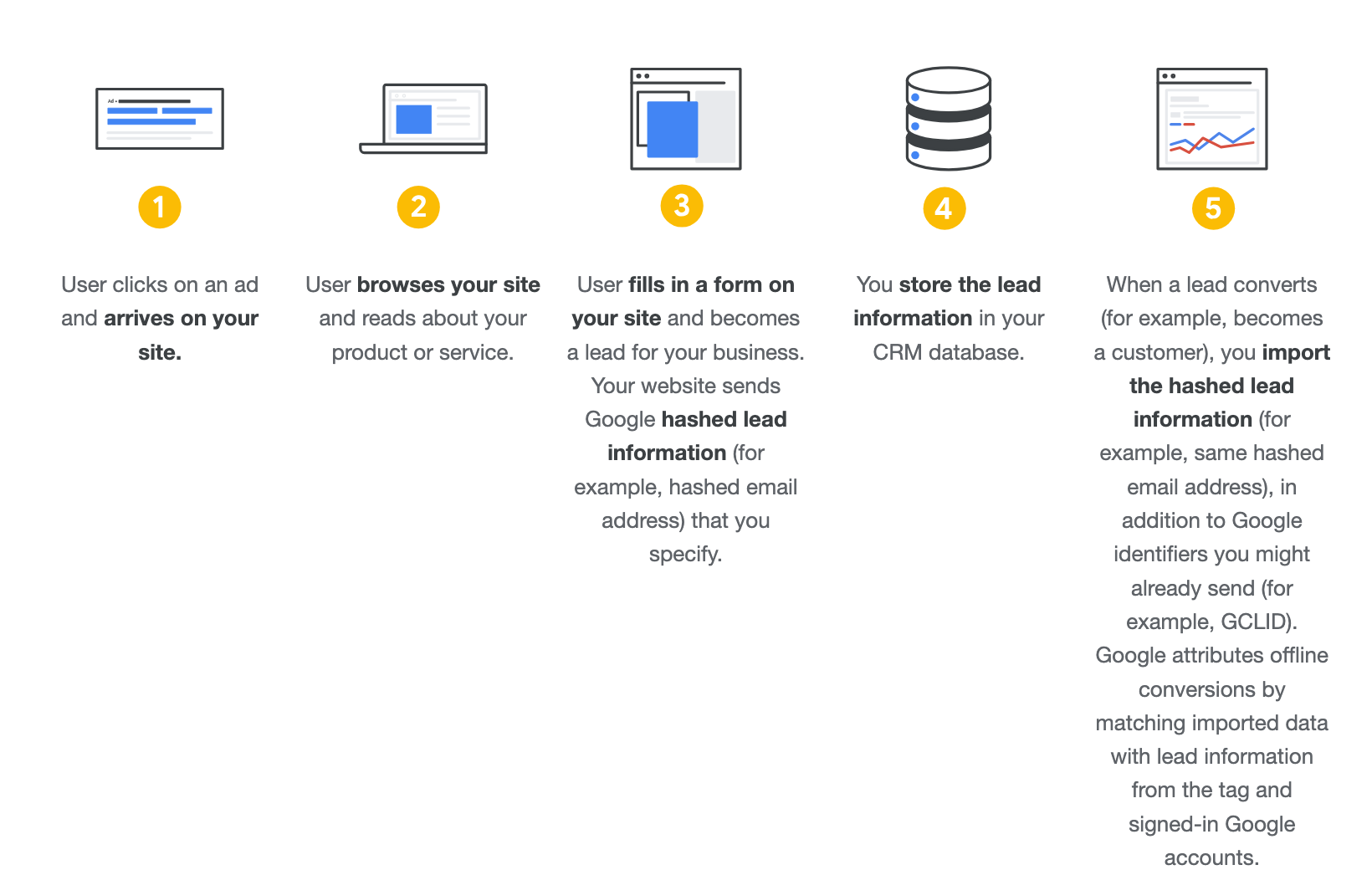
Once that loop is closed, you can tell Google which leads actually converted into enrolled, paying students, and the bidding starts hunting for people who enroll instead of people who fill out forms. This is the single highest-leverage fix for a course business, and almost nobody does it.
2. Profit, not just revenue
Revenue-based ROAS quietly assumes every dollar is worth the same. It isn’t. A seat in your $200 self-paced course and a seat in your $4,000 coached program carry wildly different margins, and Google ignores margin entirely. If you optimize on revenue, the algorithm will happily fill your account with low-margin enrollments that look great on a ROAS chart and lose you money in real life.
The number to watch is profit on ad spend, and cost per enrolled student by program, not blended. When you feed Google profit-aware values, it starts preferring the enrollments that actually pay your bills. For the broader picture of which numbers matter for a teaching business, we mapped the marketing performance metrics worth tracking for online schools.
3. The few macro actions that map to money
A macro action is tied to revenue: an enrollment, a qualified application, a paid signup. A micro action is a progress signal: a page view, a video play, a scroll. Micro actions are fine to observe. They have no business being your primary conversion. Pick the 2 or 3 macro events that actually represent money changing hands, set those as primary, and demote everything else to observation. Your reports get clearer and your bidding gets a clean signal instead of a noisy one. If you want to think this through end to end, our guide to making sense of conversion measurement walks the whole logic.
How to fix it without rebuilding everything
You don’t tear the whole thing down. You build it back in maturity order, bottom-up, because advanced features stacked on a broken base just amplify bad data faster.
First, the true foundation. Get the basic conversion action firing reliably on the real enrollment action, with a Transaction ID so refreshes stop inflating your count, and the Conversion Linker running on every page so click IDs are actually stored. This step alone moves most accounts from fiction to truth. Don’t add anything else until your 5-minute test passes.
Then, enhanced conversions. Once the foundation is clean, layer enhanced conversions to recover a chunk of that 15 to 30% you were losing. Email and phone alone cover most of the value, so you don’t wait around for a perfect data layer to start.
Then, consent mode for any EEA traffic. Privacy law follows the user, not your headquarters. If you’re a US course business with students or visitors anywhere in the EU or EEA, you still need consent mode V2 properly wired, both to stay compliant and to recover modeled conversions when someone declines cookies.
Then, offline conversion import. This is the one that closes the loop for a course funnel: pushing the real enrollment, the qualified lead, the paid student back into Google so bidding optimizes on quality instead of form volume. It sits last because it only pays off once the foundation underneath it is honest.
And then audit it quarterly. Your tracking will break again. Sites change, funnel tools get swapped, a dev pushes a fix that breaks a tag. The foundation is never finished. If you want a self-serve starting point, we publish a free checklist for getting your GA4 foundation rock-solid.
Where this fits: the 3-Pillar Method
Conversion tracking is the first of our three pillars, and it’s first on purpose. The other two, account structure and communication strategy, can only ever perform as well as the data underneath them lets them. You can have a beautifully built account and brilliant creative, and if the tracking is lying, the whole machine optimizes toward the wrong people. Get the measurement right first, then the structure and the message have something true to stand on. That’s the order we work in, and you can read how the pieces connect in our 3-Pillar framework for ads that work.
Tracking is the GPS. It’s boring, it’s unglamorous, and it’s the entire reason you arrive.
If you want to check yours without booking anything, grab our GA4 Configuration Health Check (it’s a Google Sheet you copy and work through yourself, setting by setting). And if you’d rather we just look at your account and tell you straight what’s broken, book a free audit. We’ll run the same 5-minute test on your real numbers and show you exactly where Google and reality stopped agreeing.