Google’s June 2026 Enhanced Conversions Switch: What Online Schools Must Do Now

If you run ads for an online school, a course business, a bootcamp, or a trade school, here’s the short version: Google is changing how enhanced conversions work in June 2026, and two things are about to happen at once. Web and leads collapse into one on/off setting, and the old way of uploading lead data through the Google Ads API stops working. Existing setups that were wired together over the years are exactly the ones that break quietly at the switch.
The schools that get hurt aren’t the ones who did nothing. They’re the ones who did a lot, in three different places, over three years, and never untangled it. The good news is the fix is boring and you can do it this week. Here’s what’s changing, what actually breaks at cutover, and the exact checklist to walk before June 15.
What’s actually changing in June 2026
Two changes, and they’re easy to mix up. Keep them separate in your head.
1. Enhanced conversions for web and leads become one switch
Google is combining enhanced conversions for web and enhanced conversions for leads into a single feature with a simple on/off toggle, starting in June 2026. You won’t pick an implementation method anymore. No more choosing between the Google tag, Google Tag Manager, or the Google Ads API as the way you send data. Google Ads will accept user-provided data from your website tags, from Google Ads Data Manager, and from API connections at the same time. (See Google’s own writeup in Updates to your enhanced conversions settings.)
For most schools that already had enhanced conversions on, this part is quiet. Google says no action is required to stay active, and you’ll be migrated to the unified setting automatically if you previously agreed to its customer data terms. The trap is the second change.
2. The Data Manager API migration with a hard date
Starting June 15, 2026, offline conversion imports and enhanced conversions for leads uploads are migrated to the Data Manager API and blocked in the Google Ads API. That’s the line that matters. If your lead data flows in through the legacy Google Ads API upload, that pipe is being closed, and you need to be sending through the Data Manager API instead to avoid an interruption.
Google also notes that developer tokens which haven’t sent a request between January 2026 and June 2026 won’t be allowlisted for legacy access. If you built a one-time CRM upload script two years ago and forgot about it, that’s the kind of thing that goes dark without a warning email anyone reads.
What actually breaks at cutover (from the messy school stacks we see)
Here’s the thing about enhanced conversions in a real online-school account: it’s almost never wired one clean way. It got wired three ways, by three people, across three years. A dev added the gtag during a launch. An agency layered Google Tag Manager on top later. Someone wired a CRM-to-Google-Ads upload through the API when the school started selling high-ticket cohorts and wanted to optimize for enrolled students, not just form fills.
None of those people talked to each other. So when Google flips everything to one switch and closes the API upload path, the failure shows up as a slow leak, not an error message. In accounts we audit, the patterns that bite are almost always the same three.
The orphaned API upload
This is the one with the June 15 deadline attached. A school selling a $4,000 bootcamp doesn’t care much about form-submit volume. It cares about who actually enrolled and paid 3 weeks later. So someone set up enhanced conversions for leads or an offline import to feed the real outcome back to Google, often through the legacy API. That’s the smartest thing in the whole account, and it’s exactly what stops working if it isn’t moved to the Data Manager API. The bidding signal that was telling Google “optimize for enrolled students” quietly reverts to “optimize for anyone who filled the form,” and your cost per enrollment drifts up while your reports still look fine.
Double-counting from two tags doing the same job
When enhanced conversions become one switch, the gtag-and-GTM overlap that was tolerable before gets messier. If the Google tag is capturing user-provided data and Tag Manager is firing its own version of the same enhanced-conversions setup for the same action, you get inflated, unstable numbers. We’ve seen accounts where a single duplicated setup pushed a brand-campaign conversion rate to something absurd, the kind of number that makes Smart Bidding bid into the moon on the wrong traffic. One signal per action. Pick the path, kill the other.
The school that never wired leads at all
And then there’s the opposite problem, which is just as expensive. Plenty of course businesses turned on enhanced conversions for web (purchases, checkouts) and never set it up for leads, because their sales motion is a form, then a call, then an enrollment days later. Those schools are leaving recovered conversions on the table every single day, and they’re starving Smart Bidding of the one signal that matters most: which leads actually became students.
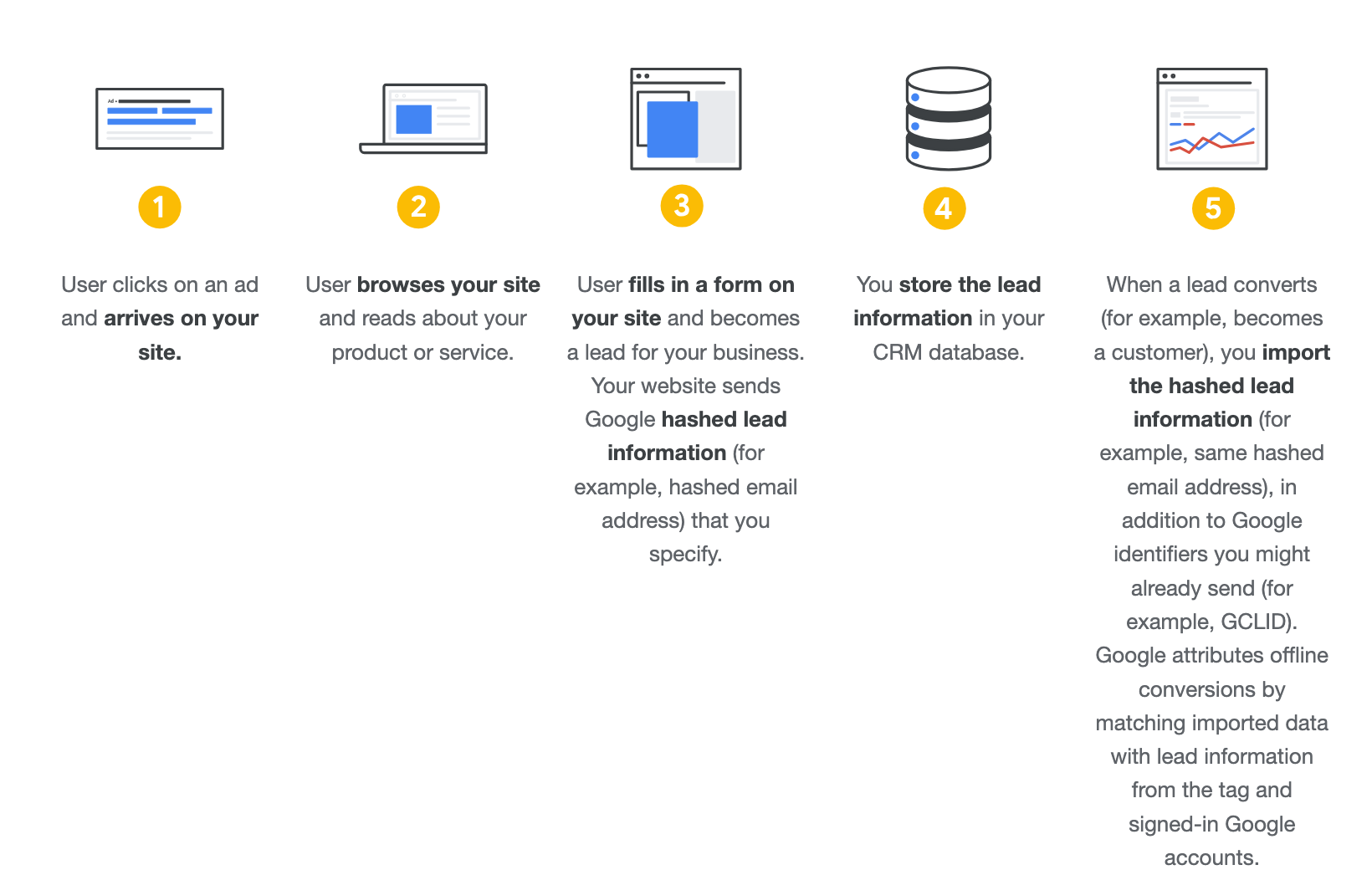
Enhanced conversions for leads sends Google hashed first-party data, an email or phone from the lead form, so it can match that lead back to a real ad click and recover conversions the pixel alone misses. For a B2C school with a lead-then-call funnel, that’s not a nice-to-have. It’s the difference between Google optimizing for cheap form fills and Google optimizing for paying students.
Why this hits online schools harder than ecommerce
An ecommerce store gets its answer in minutes. Someone clicks, buys, the purchase fires, done. The signal Google needs and the signal Google gets are basically the same event.
A school’s funnel is slower and the gap is where the money hides. Someone fills a form today, books a call, talks to admissions, and enrolls 2 to 3 weeks later. If all Google ever sees is the form submit, it optimizes for form submits, and you get a flood of cheap leads that never enroll. The whole point of enhanced conversions for leads is to close that loop and tell Google the truth about which clicks became revenue. When the plumbing for that loop is the exact thing changing in June, schools have more to lose than a store does.
This is the same principle behind everything we do in the first pillar of our method, conversion tracking: the better the signals you send Google, the better the result. The algorithm can only bid as well as the data you feed it. A migration that touches your richest signal is not a back-office IT task. It’s a budget event.
Your pre-June-15 checklist
This is the order we walk it in accounts we manage. None of it is glamorous. All of it matters.
- Find every place enhanced conversions is wired. Check the Google tag on the site, check the Tag Manager container, and check whether any CRM or backend script uploads conversions through the Google Ads API. You’re looking for the orphaned API upload most of all. Write down all three.
- Confirm anything using the legacy API upload is moved to the Data Manager API before June 15, 2026. If your offline imports or enhanced-conversions-for-leads uploads go through the Google Ads API today, that path is being blocked. Data Manager is the route forward, and it becomes the single place your first-party data connects.
- Kill the duplicates. One signal per conversion action. If the gtag and GTM are both sending enhanced data for the same event, keep one and remove the other before the unified switch makes the overlap worse.
- If you sell anything as a lead-then-enroll motion and you never set up enhanced conversions for leads, set it up now. Email and phone from your lead form cover the vast majority of the matchable value. You don’t need name and address to start.
- Validate that the real outcome is the bidding signal. For a course business, the conversion Smart Bidding optimizes toward should be the enrolled, paid student where you can measure it, not the raw form fill. If your funnel is too long for the 90-day window, optimize an earlier qualified stage instead.
- Then watch the diagnostics. After the switch, your measured conversions should track your backend within roughly 10%. If they diverge more than that, something broke in the migration and you caught it early, which is the entire point of doing this in June instead of finding out in September.
If you want the fuller foundation behind step 4 and 5, we wrote a deeper guide on conversion tracking for online course businesses, and our conversions measurement guide walks the whole stack end to end. For schools specifically, why your online school’s revenue depends on proper tracking makes the same case from the revenue side.
The honest part
I’ve audited a lot of these accounts and I’ve never met one school whose conversion tracking was already perfect. Not one. It’s not because anyone’s careless. It’s because tracking gets technical fast, it gets built in layers by different hands over years, and nobody owns the whole picture. That’s also exactly why a forced migration like this one is useful. It’s the rare moment everyone is made to look at the plumbing at the same time.
So treat June 15 as the deadline to untangle what three years of good intentions tangled up. Find the three wirings, move the API upload to Data Manager, kill the duplicate, and if your leads were never wired, wire them. Do that and the switch is a non-event. Skip it and you’ll spend the summer wondering why your cost per enrollment crept up while your dashboard looked green.
If you’d rather hand the whole audit to someone who does this every week, that’s what our first 30 days are for. We find what’s working, fix the tracking, and show you the difference before you commit to anything. You can book a call and we’ll look at your stack together.