Most trade and vocational schools running Google Ads are optimizing for the wrong number. They watch cost-per-lead, see it drop, feel good, and quietly fill the funnel with people who’ll never show up to a campus tour. Three months later enrollment is flat and nobody can explain why the “cheap leads” didn’t turn into students.
The reason is almost always the same. The form fill is treated as the finish line. For a trade school, the form fill is the starting gun. The real conversion is an enrolled student who shows up to a cohort, and there’s usually a 2 to 6 week gap between the click and that outcome. If your account can’t see across that gap, every decision you make is based on the loudest, cheapest, lowest-quality half of your data.
This is the complete system we use to run Google Ads for trade schools: HVAC, electrical, welding, CDL and truck driving, cosmetology, medical assistant and CNA, dental assisting, real estate licensing. The whole thing maps to how we think about every account, the 3-Pillar Method: measure what matters (conversion tracking), build the architecture for profitable scaling (account structure), and put the right message in front of the right people (communication strategy). Here’s the part most owners want first: the one number to track instead of cost-per-lead, how to capture the 40 to 60% of inquiries that come in as phone calls, and why your local targeting is probably bleeding budget into the next state over.
Track cost-per-enrollment, not cost-per-lead
A trade school sells a real, expensive, life-changing decision. People don’t buy a $15,000 welding program off a form fill the way they buy socks. They request info, they call, they tour, they talk to a financial aid officer, and weeks later they enroll. So the conversion you optimize toward has to be the enrollment, or the closest high-quality proxy you can measure, not the form.
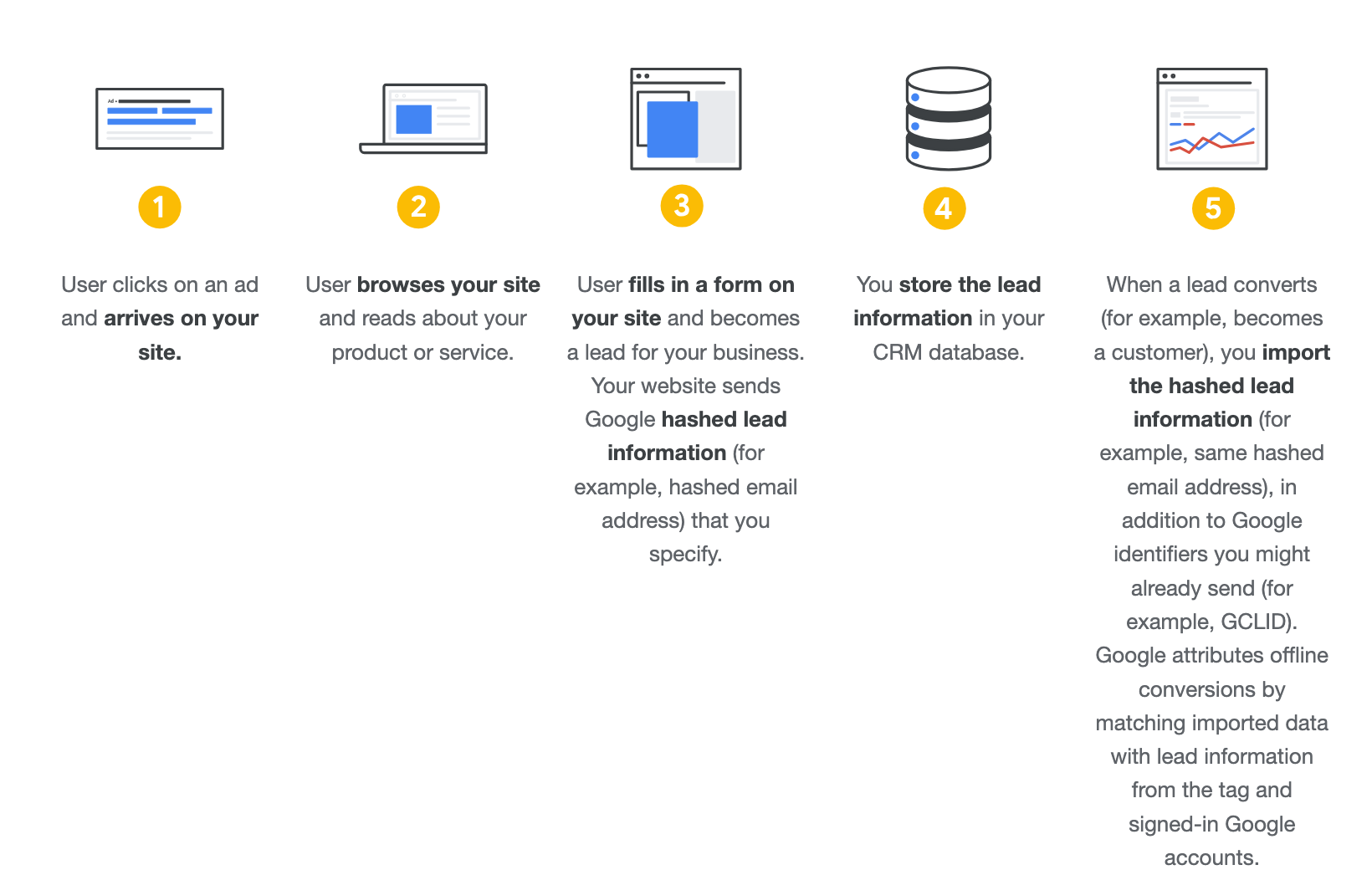
Here’s why this isn’t optional. Google’s Smart Bidding optimizes toward whatever you tell it is a conversion. Feed it “form submitted” and it gets very good at finding people who submit forms. Those are not the same people who enroll. In lead-gen accounts we see the algorithm happily chase the cheapest form fills, which are usually the worst leads, because nobody taught it the difference. The form fill is the start of the conversion, not the end.
The fix is Offline Conversion Tracking. You capture the Google Click ID (GCLID) when someone fills the form, you store it next to that lead in your CRM, and when that lead becomes a qualified inquiry, a campus visit, or an enrollment, you import that outcome back into Google with its real value. Now Smart Bidding is optimizing toward students, not paperwork. Google’s own offline conversion import documentation walks through the GCLID method.
What to actually count as a conversion
For most trade schools the smart move is a small ladder of conversions, each with a value that reflects how close it is to money:
- Inquiry / form submit: track it, but as a secondary, observation-only action. It’s a useful early signal, not what you bid on.
- Qualified inquiry or booked campus visit: this is often the best primary conversion for bidding, because it arrives fast enough to feed the algorithm and it filters out the tire-kickers.
- Enrollment / start: the real outcome. Import it as a value-bearing conversion. If your sales cycle is longer than Google’s conversion window (the default click window is 30 days, max 90), optimize toward the earlier qualified-visit stage and use enrollment to sanity-check the whole thing.
The principle: three conversions tracked well beats twenty tracked badly. Pick the stage that’s both meaningful and fast enough to give the algorithm 30+ conversions a month to learn from, and make the rest observation-only.
The proxy-value trick when you can’t wait for the enrollment
If a CDL program enrolls 6 weeks after the click and Google’s window has closed, you don’t have to fly blind. Assign a proxy value to the qualified stage: average program revenue multiplied by the rate at which a qualified visit becomes an enrollment. If a campus visit closes 40% of the time and the program is worth $15,000, a booked visit is worth roughly $6,000 to the business. Feed that value in, and bidding optimizes toward the visits that actually turn into students. It’s an estimate, but it’s a reasonable one, and it beats optimizing toward a free PDF download.
Capture the phone calls, or you’re optimizing on half your data
This is the one that quietly wrecks trade-school accounts. A huge share of inquiries for HVAC, CDL, cosmetology, and medical programs come in as phone calls, not form fills. In the accounts we manage in these verticals it’s routinely 40 to 60% of all inquiries. People want to talk to a human about financing, start dates, and whether they can do it while keeping their job.
If you’re only tracking form submissions, you’re handing Google half the picture and asking it to bid well. It can’t. The algorithm thinks the campaigns and keywords that drive calls produce nothing, so it starves them and pours budget into the form-fill keywords, which may be the weaker half of your funnel.
Call tracking fixes this. Use Google’s call conversion tracking to count calls from ads and calls from a tracked number on your site as conversions. Then apply the same enrollment logic: a call that turns into a booked visit or an enrollment is worth far more than a call that goes nowhere, so qualify the calls and feed the good ones back as the high-value conversion. When you do this, the keywords that were “invisible” suddenly show their real worth and the whole account rebalances toward what’s actually filling cohorts.
Feed your enrolled students back into Google
Your CRM is the most valuable advertising asset you own, and for most schools it’s sitting unused in a spreadsheet. The list of people who actually enrolled is the cleanest signal you can possibly give Google about who your next student looks like.
Two ways to use it, and you should use both:
- Customer Match. Upload your enrolled students (hashed email, phone, address) and Google matches them to real users. Now you can build prospecting that looks like your actual students, and you can exclude people who already enrolled so you stop paying to advertise to them. The more identifiers you upload, the higher the match rate, so don’t settle for email only.
- Enhanced Conversions. When someone converts, you send hashed first-party data along with the event so Google can recover conversions that the cookie-based pixel misses. Across channels this commonly recovers a chunk of conversions that would otherwise vanish, which on Search alone is meaningful. Google’s Enhanced Conversions documentation covers the setup; it supplements your pixel, it never replaces it.
The pattern underneath all of this: the better the signals you send Google, the better the result. Enrolled-student data is the best signal you’ve got. Most schools never send it.
Structure the account around program economics, not tidiness
A trade school is usually several very different businesses wearing one logo. An HVAC program, a CDL program, and a cosmetology program have different price points, different sales cycles, different competition, and different cost-per-enrollment math. Treating them as one blended campaign hides which programs are profitable and which are quietly losing money.
But the answer isn’t a campaign for every single thing either. The most common structural mistake we fix in real accounts is over-segmentation: too many tiny campaigns, none with enough conversions for Smart Bidding to learn from. The rule we follow is consolidate by default, and only split a program out when you can name a real reason: it needs its own budget, its own cost-per-enrollment target, or its own conversion goal (calls vs. form vs. visit).
So for a multi-program school:
- Give each program with distinct economics its own campaign when it has the volume to support it (roughly 30+ conversions a month at the stage you bid on). HVAC and CDL almost always earn this, because their economics and search behavior are nothing alike.
- Consolidate the small programs that don’t have the volume yet, rather than starving five tiny campaigns of data. You can split them out later once they earn it.
- Run a separate branded campaign. If your school has any name recognition, competitors will bid on it. A branded campaign is the cheap insurance that keeps a lead that was already yours from getting poached, and it keeps brand traffic from inflating the numbers on your non-brand campaigns so you can see your true cost to acquire a net-new student.
The point of structure is control over budget and targets, not making the account look neat. If you can’t describe in one sentence why two things are in separate campaigns, they probably shouldn’t be.
Get local targeting right, or pay to advertise where nobody can enroll
Trade schools are local or regional. People enroll where they can physically attend, or where they can relocate for. So your geography is doing real work, and there’s one setting that trips up almost every account.
Google gives you two location options, and the default is the trap. “Presence or interest” shows your ads to people who are physically in your area and to people anywhere who show “interest” in it. For a campus in Phoenix, that “interest” bucket can mean someone in another state who once searched something Arizona-related. You pay for those clicks and they will never set foot on campus.
Switch every campaign to “Presence: people in or regularly in your targeted locations.” Google’s location targeting documentation spells out the difference. This one toggle often cuts a meaningful slice of wasted spend on its own.
A few more local mechanics that matter for schools:
- Set a radius around the campus that matches who actually enrolls. A CDL school might pull from a 90-minute drive; a cosmetology program might be tighter. Look at where your enrolled students actually came from and target that, not an arbitrary 25 miles.
- Read your location reports with “Presence” on first. Until you’ve fixed the presence setting, your location data is polluted by interest traffic, so any decision you make from it is suspect.
- Remember Smart Bidding largely ignores location bid adjustments. If a city consistently produces enrollments at 2x your target cost across multiple periods, the lever that actually bites is excluding it, not nudging a bid modifier.
Filter the junk leads before they poison your bidding
Performance Max is where a lot of trade schools get burned. It promises to find students across every Google surface, and for lead gen it will happily find you the cheapest possible form fills, which are very often your worst leads. Left unmanaged, it optimizes toward junk volume and then takes credit for it.
You can run PMax for a trade school, but only with guardrails:
- Import a downstream quality signal before you launch it. If PMax can only see “form submitted,” it will chase garbage. If it can see “qualified inquiry” or “enrollment” with values, it has a reason to find better people. This is the same offline-conversion discipline from the top of this article, and for PMax it’s the difference between a useful campaign and a budget fire.
- Exclude your brand. PMax will advertise on your school’s name and quietly take credit for enrollments that were already coming, which makes its numbers look great and hides your true acquisition cost. Catch brand in a dedicated branded campaign instead.
- Mine the search terms weekly and exclude the non-converters. “Free trade school,” “is welding hard,” and job-listing searches will show up. Add them as negatives so you stop paying to educate people who’ll never enroll.
- Use “Presence” location targeting here too. PMax defaults to the same interest trap.
Treat PMax as additive, something you run next to a well-built Search campaign once your tracking is clean, never as the whole strategy you hand the wheel to.
The communication layer: match the offer to where the person is
Tracking and structure are the foundation. They make the account measurable and scalable. But none of it matters if the ad sends people somewhere weak. An ad is an amplifier. If the offer behind it is mediocre, more budget just means more people find out it’s mediocre.
For trade schools, the offer and message have to meet the real decision someone’s making. They’re weighing a career change, money, time, and whether they can pull it off. So:
- Lead with the outcome, not the program. “Become a licensed electrician in 9 months” beats “enroll in our electrical program.” People are buying the career, the license, the income, the start date.
- Put the friction-killers up front. Financial aid availability, next cohort start date, job placement support, evening or weekend schedules. These are the actual objections that stop an enrollment.
- Send each search to a page about that program. Someone searching “CDL training near me” should not land on a generic homepage. The page is where the decision gets made, so it has to answer that specific person’s questions.
Once that foundation is solid, the offer, the landing page, the tracking, the structure, that’s when creative and video earn their keep. A strong video walking someone through the welding lab or a day in the dental-assisting program amplifies an offer that already works. We build the foundation first, then produce the creative that carries it.
How to roll this out without breaking what’s working
You don’t fix all of this in a week, and you shouldn’t try. The order matters, because each layer makes the next one trustworthy:
- Fix tracking first. Get call tracking live, get offline conversion import working from the CRM, define the conversion ladder (inquiry → qualified visit → enrollment). Until this is right, nothing downstream can be trusted.
- Fix location targeting. Switch everything to Presence, set realistic radii, then re-read your geo reports with clean data.
- Restructure around program economics. Split out the programs that earn their own campaign, consolidate the rest, separate brand.
- Then tighten communication. Match offers and pages to programs and search intent.
- Then, and only then, expand. Layer in PMax with quality signals, Customer Match prospecting, and creative.
Trade schools have a structural advantage most advertisers don’t: a clear, valuable, measurable outcome and a CRM full of proof. The schools that win on Google Ads aren’t the ones spending the most. They’re the ones that measure cost-per-enrollment, capture every call, feed their student data back to Google, and stop paying to advertise where nobody can enroll. Do those four things and the budget starts pulling toward students instead of paperwork.
If you want to go deeper on the measurement layer that all of this sits on, our breakdown of conversion tracking for course and education businesses covers the technical side, and the 3-Pillar Framework explains how tracking, structure, and communication fit together. For a related local lead-gen play, see how driving schools use public DMV records to boost enrollments.