Cross-Channel Attribution in 2026: How to Measure It

Updated November 2026.
Google Ads, Meta and your CRM each report a different number of sales. All three look right. Cross-channel attribution decides which channels get credit for a sale. It follows the buyer across search, social, email and calls, and splits the credit between touchpoints.
- What it does: splits credit for each sale across its touchpoints.
- Why it matters: shows which channels earn sales and which take the credit.
- Challenges: siloed data, models with blind spots, sales that close offline.
- Solutions: compare models, connect your CRM, test with holdouts.
One rule holds through the rest of this guide: pick one number you trust, usually closed sales in your CRM or store, and judge every platform report against it.
What is cross-channel attribution?
Cross-channel attribution connects a buyer’s touchpoints across channels (a Meta ad, a blog post, an email, a Google search, a phone call) and gives each one a share of the credit for the sale. The share comes from an attribution model, which is a rule or a statistical method for splitting the credit. Three terms get mixed up, so here’s the difference.
| Term | What it describes | The question it answers |
|---|---|---|
| Multi-channel | Ads run in several channels, and each channel is reported on its own | How did each channel do, by its own report? |
| Cross-channel | The channels are connected into one buyer journey | Which touchpoints led to this sale? |
| Omnichannel | The buyer’s experience is joined up across channels | Is the experience consistent in every channel the buyer uses? |
Three methods sit under the topic. Multi-touch attribution (MTA) credits the individual touchpoints along a journey. Marketing mix modeling (MMM) uses aggregate spend and sales over time to estimate what each channel adds, with no user-level tracking. Incrementality testing switches a channel off for a group of people or a region and measures what changes.
Use MTA for campaign decisions, MMM for yearly budgets, and incrementality tests to settle arguments.
Why your platforms report more sales than you made
Every ad platform counts the conversions it can see and takes credit for the ones it touched. Google Ads counts a sale when a Google ad interaction came before it. Meta counts the same sale when someone interacted with a Meta ad before it. Each platform has its own attribution window and its own rules, so one sale can show up in two or three reports. The numbers below are illustrative.
| Source | Sales reported for the month | What it counts |
|---|---|---|
| CRM | 100 | Closed sales, each counted once |
| Google Ads | 62 | Sales that followed a Google ad interaction |
| Meta | 48 | Sales that followed a Meta ad interaction |
| Microsoft Ads | 14 | Sales that followed a Microsoft ad interaction |
| Ad platforms combined | 124 | Some sales are counted two or three times |
The platforms claim 124 sales between them for 100 real ones. That’s 24 extra claims: sales that two or three platforms counted, plus any conversions a platform counted that your CRM never saw as a sale, such as a form fill that didn’t close.
A check that needs no model: divide total ad spend across all channels by the real sales in your CRM. Say you spent $50,000 and your CRM shows 100 closed sales (illustrative). Your blended cost per sale is $500, whatever each platform claims. Track it weekly. If it falls after you launch a YouTube campaign, that’s a sign YouTube is helping, even when its own report shows few sales. A holdout test confirms it.
How cross-channel attribution works, step by step
Every setup follows the same five steps.
1. Collect the touchpoints
Tag every ad click so you know where it came from: UTM parameters on links, the Google click ID (GCLID) on Google Ads clicks, and a tracked phone number for calls. Ask for consent where the law requires it. A touchpoint you don’t record can’t get credit.
2. Identify the person
Match touchpoints to the same buyer. A logged-in user ID is the strongest link, and a hashed email or phone number collected with consent is the next best. Without a link, one buyer on a phone and a laptop looks like two people.
3. Connect the data
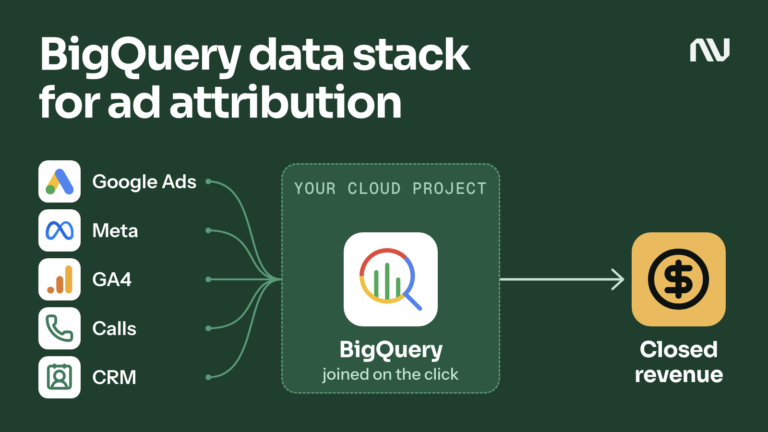
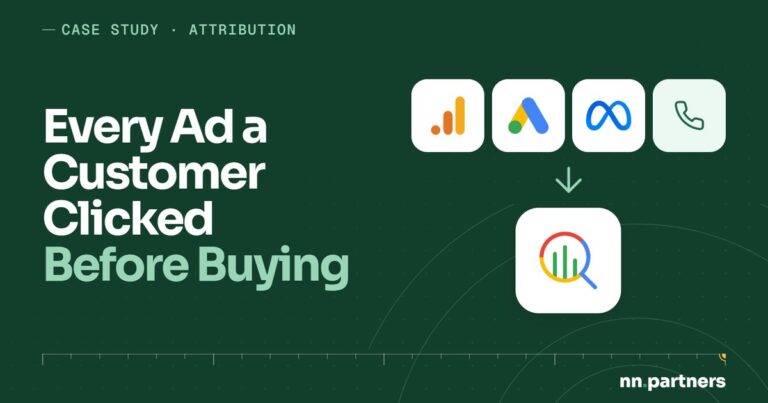
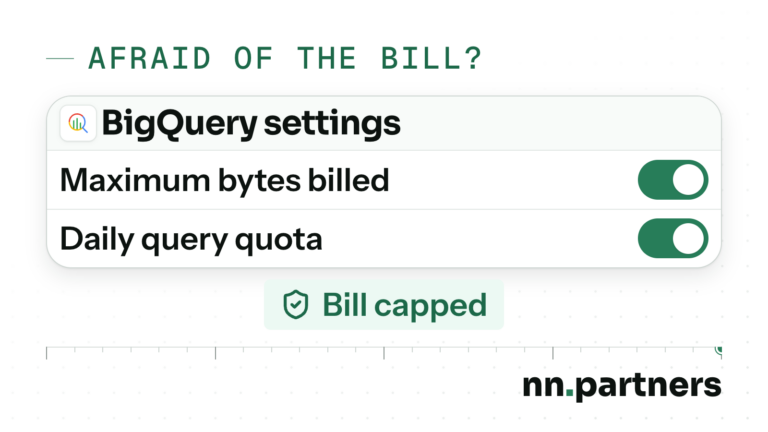
Bring ad platforms, site analytics, call tracking and the CRM into one place, so a click and a closed deal can sit in the same row. Many teams use a warehouse such as BigQuery, and here’s what BigQuery costs for marketing data.
4. Credit the touchpoints
Apply an attribution model to the connected journeys. The next section runs one journey through six models, and the answers differ.
5. Act on it
Move budget, change bids, and send the outcomes back to the ad platforms so their bidding learns from real results. Then check the outcome against the CRM, and repeat.
Attribution models compared
Take one journey. A lead-gen buyer clicks a Meta ad on day 1, reads a blog post found through organic search on day 9, clicks an email on day 20, searches for the brand and clicks a Google ad on day 26, and signs on day 30. This is how six models split the credit for that one sale (illustrative).
| Model | Meta ad click, day 1 | Organic blog, day 9 | Email, day 20 | Google ad (brand), day 26 | In GA4 today |
|---|---|---|---|---|---|
| First click | 100% | 0% | 0% | 0% | No, removed November 2023 |
| Last click | 0% | 0% | 0% | 100% | Yes |
| Linear | 25% | 25% | 25% | 25% | No, removed November 2023 |
| Time decay (7-day half-life) | 5% | 10% | 30% | 55% | No, removed November 2023 |
| Position-based (40% first, 40% last, 20% shared) | 40% | 10% | 10% | 40% | No, removed November 2023 |
| Data-driven | Varies | Varies | Varies | Varies | Yes |
Same sale, six answers. First click says Meta earned it. Last click says the brand search did, and the brand search is the easiest touch to win, because the buyer was already looking for you.
GA4 offers three models today: data-driven, paid and organic last click, and Google paid channels last click. Google’s GA4 help page says the first click, linear, time decay and position-based models are no longer available as of November 2023. In Google Ads, data-driven attribution is the default for most conversion actions, last click is still supported, and the other rule-based models are not.
Data-driven attribution works from your account’s own data. It compares converting and non-converting paths and estimates how much each ad interaction changed the chance of a conversion.
How to choose an attribution model
Start from the question you’re asking.
- Which channels bring new buyers? Read the journeys from the first touch.
- Which channel closes the sale? Last click answers that.
- How do channels share a long journey? Use data-driven or position-based credit, with a window as long as your sales cycle.
- Does this channel cause sales, or collect sales that would have happened anyway? No model answers that. Run a holdout test.
Match the window to your sales cycle. In GA4, the lookback window for most key events defaults to 90 days (30 and 60 are the other options), and for the two acquisition key events, first_visit and first_open, it defaults to 30 days (7 is the other option). A deal that closes after the window ends loses its link to the ad that started it.
Data volume matters too. Data-driven models learn from your conversions, so an account with a few conversions a month gives them little to learn from. In that case a rule-based model you can explain beats a model you can’t check.
When a model can’t settle a question, test it. Hold out a region or an audience from one channel for several weeks, long enough to cover your sales cycle, and compare sales with a matched group that kept seeing the ads. The gap is what that channel adds.
Common attribution problems
Disconnected data
Each platform stores its own data in its own format and identifies people its own way. Nothing joins them unless you build the join, so every report tells the story from one seat.
Model shortcomings
Last click ignores everything before the final touch. Data-driven models see only the touchpoints that were tracked, so their confidence depends on the tracking under them. Every model simplifies how a person decided to buy.
Hidden interactions
Word of mouth, podcasts, events, private shares and a colleague saying “try these guys” leave no click behind. They tend to surface as direct traffic or branded search. A cheap fix is a “How did you hear about us?” field on your forms, read next to your tracked data.
Delayed conversions
Many businesses sell over weeks. The ad click happens on day 1, the deal closes on day 40, and a report run on day 10 undercounts. Group campaigns by click date, and check again after your sales cycle has passed.
Multiple devices
The buyer reads on a phone and signs on a laptop. Without a user ID or a matched email, the two visits look like two people, and the sale lands on direct or on the last channel the laptop saw. Properly built conversion tracking and a form that captures a consented email narrow the gap, and some of it stays.
When the sale closes offline: attribute to closed deals
Most attribution advice assumes the sale happens on your website. For a lead-gen business or an online school it doesn’t. The ad click ends in a form or a phone call, and the sale closes weeks later in a CRM, after calls with a sales or admissions team.
Platforms see the form. They optimize for the people who fill it, and some of those people never buy. The channel that brings the most leads and the channel that brings the most closed deals can be different channels. Four moves close the gap.
- Save the click ID with every lead. Store the GCLID and UTM values in hidden form fields and pass them to the CRM. For calls, use tracked numbers that record the source.
- Keep the stages in the CRM. Lead, qualified, won, each with a date.
- Send the outcomes back. Google Ads can import offline conversions: you upload the sale with the click ID, or use enhanced conversions for leads, which adds user-provided data such as an email address. If you upload through an API, build on Google’s Data Manager API: Google’s help says that from 15 June 2026 these uploads are blocked in the Google Ads API. Bidding then learns from closed deals instead of form fills.
- Report on cost per closed deal. Put ad spend and CRM outcomes in BigQuery and compare channels on closed deals. Our guide to joining ad spend to closed deals shows how.
In 9 years I’ve never met one client whose tracking was perfect. Not one. Expect gaps. Phone sales on a number you don’t track, visitors who decline consent and buyers who switch devices won’t match, and a good setup tells you how big each gap is. When your Google Ads conversions and your CRM disagree, the causes are usually the same few, and this post walks through them.
My team and I have seen what better signals do. On one account with a sales team, after we changed which events are recorded and sent to the ad account, the share of leads with the highest value grew from 10% to 30%.
This chain, from click to closed deal, is what our data audit checks: four layers, from ad events and business data (your CRM and calls) to the warehouse that joins them and the dashboards you report from.
Using attribution to split your budget across channels
Attribution earns its keep when it moves budget. Start with cost per closed deal, or cost per sale, by channel, from the connected data. Then compare it with what each platform reports. A channel whose own report looks strong and whose closed-deal numbers look weak is a candidate to trim.
Match channels to the job they do. Meta and YouTube start journeys, search captures people who already want something, and retargeting and email finish them. A channel that opens journeys looks weak under last click and strong under first click, so judge each one on its job.
A split many teams use as a starting point is 70/20/10: 70% of budget on channels that already prove themselves, 20% on growing them with new audiences, formats or bidding, and 10% on tests. It’s a rule of thumb, so change it when your data says otherwise. Move budget in small steps, and wait out your sales cycle before you judge the move.
How to set it up in 90 days
| Month | What you do | What you have at the end |
|---|---|---|
| Month 1 | Audit the tracking you have. Define the one number you trust, closed sales. Pick your tools. | A clean list of events and one definition of a sale |
| Month 2 | Implement tracking with click IDs saved on every lead. Connect ad platforms, analytics, calls and the CRM. | Connected data from click to deal |
| Month 3 | Compare against the CRM. Run two or three models side by side. Test one channel with a holdout. Train the team. | A working report and one tested budget decision |
How to test that your numbers are right
- Reconcile every month. Add up the sales the platforms report and compare the total with your CRM. The gap is your double counting, and a gap that grows means something changed.
- Trace 10 closed deals by hand. Follow each one back to its click, call and first touch. Lost click IDs show up fast.
- Watch direct traffic. A rising share of direct visits is a prompt to check your tagging.
Privacy and consent
Attribution runs on personal data, and in the EU most tracking tags and cookies need consent before they fire. Under the GDPR, consent has to be freely given, specific, informed and unambiguous, and people can withdraw it at any time, as easily as they gave it. In California, the CCPA, as amended by the CPRA, gives residents the right to know what a business collects, to delete it and to opt out of its sale or sharing. This is a summary of the rules, not legal advice; check your setup with your lawyer.
Cookie rules differ by browser and change over time. On 22 April 2025, Google said Chrome keeps its current approach to third-party cookie choice and won’t roll out a new standalone prompt, and in October 2025 it retired the Privacy Sandbox tools built to replace cookies, including the Attribution Reporting API. Build on first-party data collected with consent, so a change in one browser doesn’t break your measurement.
Attribution tools
You need four jobs covered, whatever the brand names on the tools.
- Collection: a tag manager, server-side tagging and call tracking.
- Analytics: GA4 for site behavior and Google’s data-driven model.
- Joining the data: a warehouse such as BigQuery, or a customer data platform if you already run one.
- Reporting: dashboards in Looker Studio or similar, reading from the joined data.
Attribution software sells ready-made models; check its numbers against your CRM like any platform’s.
My team and I have spent 9 years in paid media and measurement and managed $10M+ in ad spend. We’re a Google and Meta Partner. For lead-gen businesses we build the chain from ad click to call to CRM to closed deal, in one BigQuery warehouse. See our analytics and data intelligence work and the 3-Pillar Method behind it.
Frequently asked questions
What is cross-channel attribution?
Cross-channel attribution decides which marketing channels get credit for a sale. It follows a buyer across touchpoints such as search ads, social ads, email and phone calls, then splits the credit using an attribution model. The result shows which channels start journeys, which close them, and where budget pays off.
How do you measure cross-channel attribution?
Connect ad data, site analytics, calls and your CRM so each sale links back to its touchpoints. Apply an attribution model to those journeys, then reconcile the totals with real sales. Add holdout tests for channels where the model can’t tell causing a sale from collecting one.
How do you optimize cross-channel attribution?
Fix the data first: save click IDs with every lead, send CRM outcomes back to the ad platforms, and compare cost per closed deal by channel. Then move budget in small steps and wait out your sales cycle before judging the change. Repeat the CRM reconciliation every month.
What is cross-channel attribution modeling?
It’s the choice of rule or method that splits credit across touchpoints: first click, last click, linear, time decay, position-based or data-driven. Rule-based models follow a fixed formula, and data-driven models estimate credit from your own paths. Comparing two or three on the same journeys shows how much the answer depends on the choice.
What is the difference between cross-channel and multi-channel attribution?
Multi-channel reporting reads each channel on its own, so each platform judges its own results. Cross-channel attribution connects the channels into one buyer journey and splits credit between them. The difference shows when two platforms claim the same sale: only the connected view can tell you it was one sale.
What is the difference between attribution and an attribution model?
Attribution is the whole job of tracing a sale back to the marketing that influenced it. The model is the one step that decides how much credit each touchpoint gets. You can change a model in minutes, but the tracking, identity matching and data joins under it decide whether its answer is worth using.
How does cross-channel attribution work for affiliate marketing?
Affiliate links often sit at the end of a journey, so last click gives affiliates credit for sales another channel started. Compare affiliate sales under a model that credits earlier touches, review coupon and cashback sites on their own, and match affiliate-reported sales to CRM or store orders before you pay commission.
Which attribution model does GA4 use?
GA4 offers three models: data-driven, paid and organic last click, and Google paid channels last click. First click, linear, time decay and position-based were removed in November 2023. The lookback windows in your property’s attribution settings default to 30 days for acquisition events and 90 days for other key events.
Next step
If your platforms and your CRM disagree, start by finding out where the numbers stop matching. The data audit checks your four data layers and shows where each one leaks.