Google Ads for Online Schools: How to Turn Ad Spend Into Enrollments

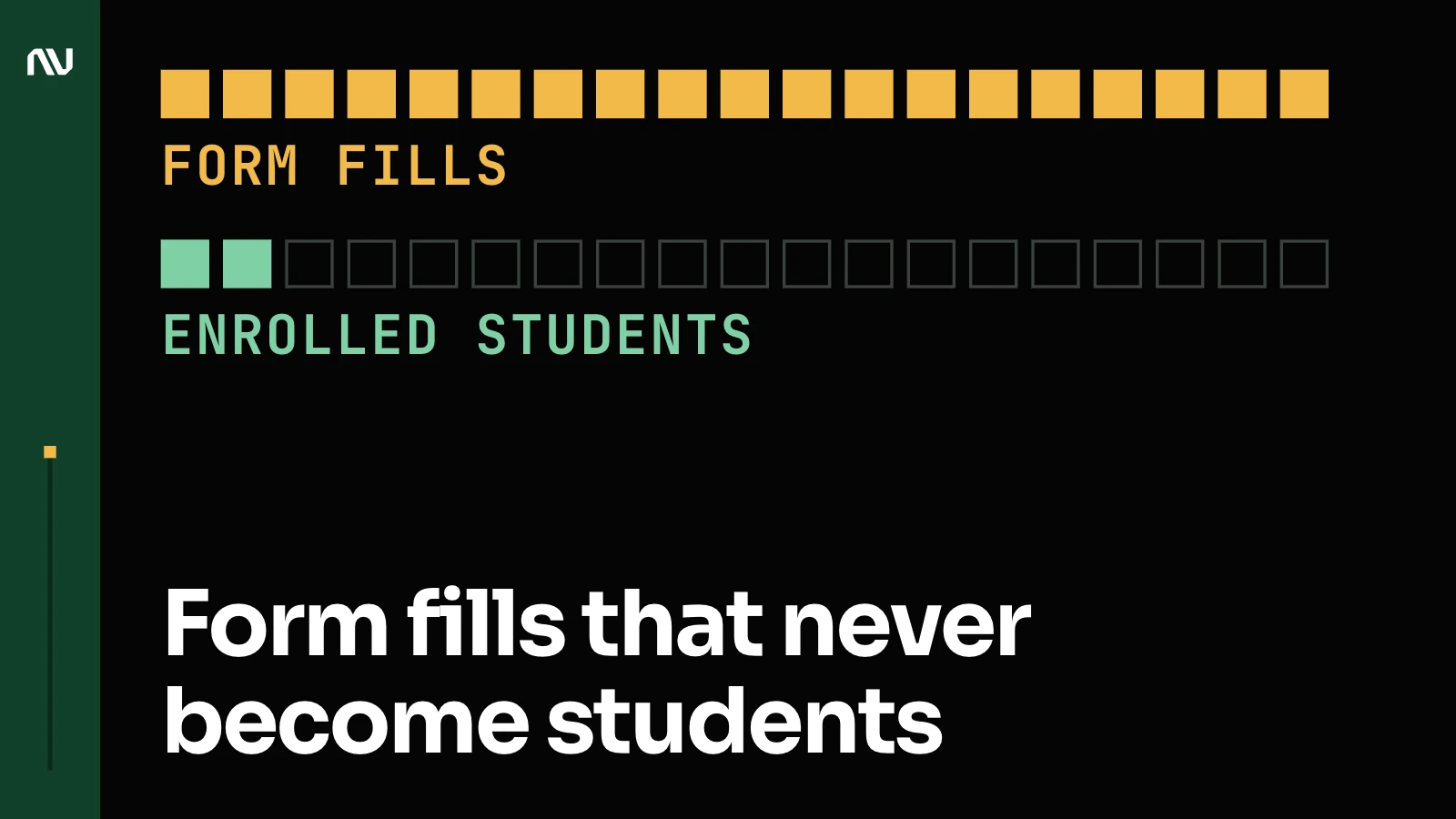
Most online schools running Google Ads have a fair budget, good programs and ads that run. What’s missing is a line from the click to the enrollment, so Google’s automation learns from form fills and gets very good at buying form fills that never become students.
So how do you set up Google Ads for an online school so it buys students?
Google Ads fills your programs when it learns from enrollments: know what an enrollment is worth, show Google every one, then build campaigns by program and student intent.
This guide is for online schools, course and certificate providers, bootcamps and licensing schools that sell programs online. K-12 schools and Google Ad Grants nonprofits play by different rules, so they’re out of scope.

Your budget comes from your enrollment math
What does Google Ads cost an online school?
Pinpointing a single “average cost” for online education is hard, because the budget depends on your return on ad spend (ROAS) goal and the size of your market. Work it backwards from your own numbers: a $900 course at a 3x ROAS target can afford $300 per enrollment, so 100 students a month needs about $30,000 in spend.
| Input | Example | What it gives you |
|---|---|---|
| Course price | $900 | Revenue per enrollment |
| Target ROAS | 3x | Most you can pay per enrollment: $900 / 3 = $300 |
| Qualified leads that enroll | 1 in 3 | Most you can pay per qualified lead: $300 / 3 = $100 |
| Students you want a month | 100 | Monthly budget: 100 x $300 = $30,000 |
If your students pay a substantial monthly fee, pick between plans and can cancel, budget from lifetime value instead of the first payment. Same math, bigger first number.
Then sanity-check the goal against the market. Look at government data or licensing information for your field to gauge the true potential, but never assume you’ll capture 100% of it.
Track cost per inquiry, per application and, above all, per enrollment, and report ROAS as a ratio (3x). Pace spend around intakes, enrollment deadlines and seasons (back-to-school, New Year resolutions), so the money is there when students decide.
More depth: what an enrollment should cost an online school.
Google can only find students if it sees your enrollments
You’ve got a fast car, a full tank, and you’re driving from New York to Austin with no GPS. You’ll burn the fuel either way. Conversion tracking is the GPS: the better the signals you send Google, the better the result. Simple as that.
When my team and I check ad accounts, people say, “Yeah, we use data.” But often it’s not set up right. In 9 years I’ve never met one client whose tracking was perfect. Not one.
Make the enrollment, or a qualified lead, the goal Google optimizes for
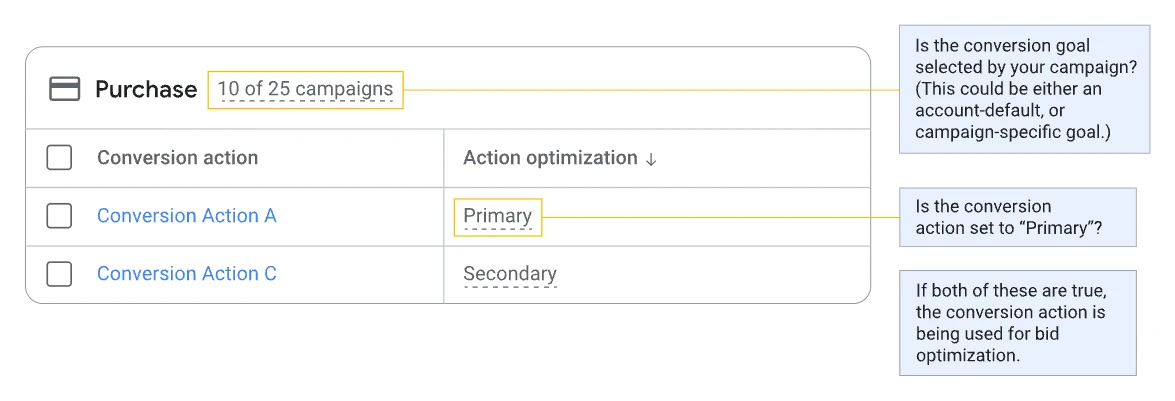
Google has 2 kinds of conversion actions. Primary actions show in the “Conversions” column and drive bidding; secondary actions show in “All conversions” and are for observation only (Google: primary and secondary conversion actions). Keep as few primary conversions as possible, and only the ones that mean money.
| Step | How it’s recorded | Set it as |
|---|---|---|
| Enrollment (tuition or first payment) | Imported from your CRM, with its value | Primary |
| Qualified lead or completed application | Marked by admissions in the CRM, imported | Primary while enrollments are too few or too slow to bid on |
| Inquiry form, booked call | Website tag or call tracking | Secondary |
| Brochure or syllabus download, webinar sign-up | Website tag | Secondary |
| Program page views | GA4 | Retargeting audience only |
Send the enrollment back from your CRM
A form fill is the start of the journey. The enrollment often comes weeks later, once admissions has worked the lead, and if Google never sees it, Google never learns which clicks were worth buying.
Enhanced conversions for leads closes that gap. Your site sends Google a hashed version of the email or phone a prospect submits; when the student enrolls, you import the enrollment with the same hashed data, and Google matches it back to the ad (Google: about enhanced conversions for leads). It’s an upgrade of offline conversion import, and Google still recommends sending the click ID (GCLID) wherever you have it.
Offline conversion import is the older route: store the GCLID with the lead and hand it back when the student enrolls. Google accepts GCLID conversions up to 90 days after the click (63 days when matched on personal data) and recommends uploading daily or on a steady schedule (Google: offline conversion imports FAQ). If a developer built your upload on the Google Ads API, have them check it now: Google says that starting June 15, 2026, offline conversion import and enhanced conversions for leads uploads move to the Data Manager API and are blocked in the Google Ads API (Google: about offline conversion imports).
Attach a value to every enrollment: a $12,000 program and a $900 short course shouldn’t count as one identical “lead”, and Google needs values to bid on value. Set the enrollment’s conversion window longer than your usual lead-to-enrollment time: Google allows 1 to 90 days, depending on the conversion source, with 30 as the default (Google: about conversion windows). If enrollments usually land more than 90 days after the click, make the qualified lead or application your primary conversion.
If admissions runs on the phone, count and record the calls: the objections students raise there belong in your ads. Mechanics: offline conversion tracking for a sales team and what online schools must do about enhanced conversions.
If you serve visitors in the EEA, consent mode passes each visitor’s consent choice to Google, and Google models the conversions it can’t observe (Google: about consent mode).
Check your tracking in 10 minutes
Open the conversions section in your ad account. If the numbers for your most important action look weird or don’t match your real enrollments, fix that before anything else in this guide.
- Your primary conversion is an enrollment or a qualified lead.
- Form fills, downloads and webinar sign-ups are secondary.
- Last month’s enrollments in Google Ads roughly match your CRM.
- Each enrollment carries a value (the price, or the expected lifetime value).
- Every CRM lead stores its GCLID and the email and phone for enhanced conversions for leads.
- The enrollment upload runs on a fixed schedule, and someone hears when it fails.
- Auto-tagging is on, so the GCLID exists in the first place.
- Phone enrollments are counted through call tracking.
- No action counts twice (2 tags on one form is the usual culprit).
- If you have EEA visitors, consent mode sends the consent state.
Get the Measurement Framework sheet my team and I use to plan this. Missed 3 or more? The free data audit checks this for you.
The full test: conversion tracking for online course businesses. How we set it up: conversion tracking.
Brand, program and theme campaigns each do a different job
Most schools mix cold and warm audiences, cram multiple programs into one campaign, or test new ideas without isolating variables. Give each campaign one job and you can see which one pays.
| Campaign | Its job, with an example search | Bidding |
|---|---|---|
| Brand | Protect your name; competitors bid on it. Example: “[school name] reviews” | Target impression share |
| Program | One program per campaign, with its own budget and page. Example: “online medical coding certificate” | Target CPA, then target ROAS once values flow |
| Broad theme | Reach people earlier in their research. Example: “healthcare career change” | Broad match in theme ad groups, target CPA |
| Competitor (optional) | Win comparers with a clear reason to pick you. Example: “[competitor] alternative” | Target CPA, separate budget |
| Retargeting | Bring back people who started and stopped. Example: any search, from someone who’s been on your site | Audience lists on Smart Bidding |
Start brand and program campaigns on day 1. Add broad theme campaigns once the program campaigns convert, a competitor campaign when you can say why you’re better, and retargeting once tracking feeds your audiences.
Brand is typically your money-maker, with the highest conversion rate and ROAS. Students searching your name are already interested; leave it unprotected and you’re handing your warmest leads to whoever bids on it.
Keywords: program names, qualifiers and questions
Build each program campaign around the program name, the qualifiers people search with (“no GMAT”, “accredited”, “cost”, “financing”, “part time”) and questions like “how long does it take to get an online MBA?”. My team and I use simple, clear broad match keywords organized into theme-based ad groups, one theme per ad group.
Add negatives from day 1. If you sell paid programs, “free” is an easy one. “Scholarship” is your call: it blocks freebie hunters, and also some students who’d pay with aid.
Do single keyword ad groups still work?
Single keyword ad groups (SKAGs) were effective years ago. Today they cut your data into slices too thin for Smart Bidding to learn from. Group closely related keywords by theme, keep one program per campaign, and let broad match with Smart Bidding find the variations.
Location: target where a student can enroll or get licensed
“Presence or interest” reaches people in your locations and people interested in them; Google recommends it as a best practice for Search. “Presence” reaches people in, or regularly in, your locations; Google suggests it when you only want people in specific locations (Google: location targeting options). For a licensing school whose students must live or get licensed in one state, “Presence” stops you paying for people who can’t enroll.
Retarget by how far each student got
Keep prospecting and retargeting in separate campaigns, so cold and warm traffic each get their own message and budget. Then split warm traffic by depth. The half-finished application is your hottest list, so spend there first; program-page visitors and brochure downloaders come next. Exclude current students with a Customer Match list: Google lets you exclude your data segments on Search, Display, Demand Gen, Standard Shopping, Video and Performance Max campaigns (Google: about audience segments). Google also says Customer Match lists won’t be used with manual bidding strategies (Google: about Customer Match).
Audiences also let you go broad safely: if 10,000 people viewed your nursing program page from a Facebook ad, you can reach them on a term as broad as “nursing”, because the audience supplies the specificity.
Bid by each campaign’s job, and move to value-based bidding last
Brand gets target impression share (see the question below). Program and theme campaigns start on target CPA against your primary conversion and move to target ROAS once enrollment values flow in.
Get the enrollment import solid first, give it a few weeks of data, then switch the bid strategy. In the wrong order, you teach the system noise. Google suggests judging Smart Bidding over periods with at least 30 conversions, and 50 for target ROAS (Google: about Smart Bidding), which is why a campaign with 4 enrollments a month swings week to week. Leave budgets room to work (Google tells target CPA advertisers to be comfortable with daily spend of up to 2 times the average daily budget: Google: about target CPA), and after you create a bid strategy, change its settings, or add or remove campaigns from it, wait out the “Learning” status: Google says calibration typically takes 1 to 2 conversion cycles (Google: duration of the learning period). If a lead takes 3 weeks to enroll, that’s 3 to 6 weeks.
Should brand campaigns use target impression share?
Yes, in most school accounts. Brand searchers already want you, so the job is to show up at the top every time. Some suggest bidding for clicks; on your own name the ad’s relevance takes care of click quality, so all you need from Google is visibility. Google calls target impression share useful for campaigns with brand terms and suggests 100% for brand searches; set a max CPC bid limit so a bidding war on your name has a ceiling (Google: about target impression share).
More on structure: Google Ads account structure for eLearning and how my team and I run PPC for online schools.
Every ad and landing page has to answer the question that student is asking
Imagine stepping outside your office to talk about your school. On a good day, you might reach 10 or 20 people. Ads multiply that by a city, a state or a country, so the message had better be the right one.
Students enroll for an outcome: a new job, a promotion, a license. Would you enroll in a course because it has a mobile app, or because it can help you land a better job? Each kind of student asks a different question:
- Career changer: “Will this get me a new job?” Show graduate outcomes.
- Upskiller: “Can I fit it around work?” Show the time it takes and the value.
- Licensing student: “How fast can I get licensed?” Show the path.
- Comparer: “Why you over the other school?” Show reviews, testimonials and specifics.
Answer the objections in the ad: accreditation, flexibility, financing and payment plans, career support. Use every headline and description slot Google gives you. Turn each feature into the result it buys: “20 Video Lessons” becomes “Get Licensed in 2 Months or Less” (only if that’s true for your program).
Then make the top of the landing page answer the ad. A student who clicks an ad promising a complete career change and lands on a generic page listing course modules is gone.

Claim only what you can prove. Google doesn’t allow ads that entice users with an improbable result; testimonials that claim specific results need a visible disclaimer; a guarantee needs a clear refund policy (Google: unreliable claims). Misleading statements about your qualifications fall under misrepresentation (Google: misleading representation). Accreditation, job outcomes and salaries go in only when you can back them up.
For retargeting, write by stage: “Still deciding on your program?” for browsers, “You’re almost done, finish your application” for people who stopped halfway. Answer the objection that probably stopped them; your recorded sales calls tell you which one.
Real education ads, taken apart: eLearning ads that work.
AI Max, Performance Max and Demand Gen widen your reach once the signal and the message are right
Each of these optimizes toward whatever conversion you give it. Feed it form fills and you get cheap form fills at scale; feed it enrollments with values and it works for you. That’s why they come last in the order.
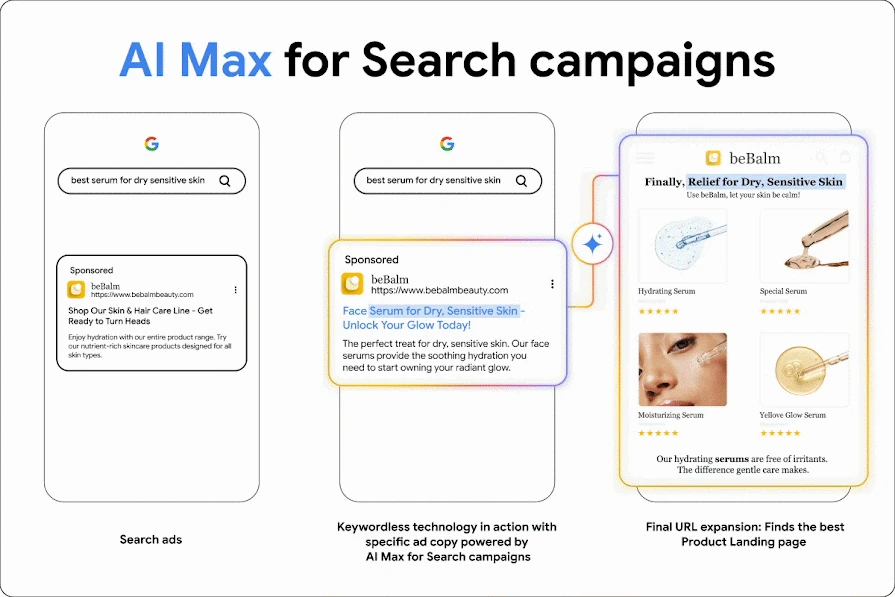
AI Max for Search is an optimization layer you turn on inside an existing Search campaign: search term matching beyond your keywords, customized headlines and descriptions, and final URL expansion, with brand and URL controls (Google: how AI Max works). Google is moving Dynamic Search Ads into AI Max, with the automatic upgrade of DSA campaigns now set to begin in February 2027 (Google: DSA upgrade to AI Max). Turn it on in your strongest Search campaigns once tracking is clean, review the queries it matched in the first weeks (the search terms report labels them “AI Max”), and add negatives aggressively. More: AI Max for Search.
Performance Max reaches all Google Ads inventory from one campaign: YouTube, Display, Search, Discover, Gmail and Maps (Google: about Performance Max). It’s an amplifier. Give it a flat offer and dull creative and it amplifies dullness. Give it real student stories, clear outcomes and good video; my team builds that creative and video once the foundation is in place. Use brand exclusions and negative keywords, and watch the channel performance report: cheap placements can look great on paper and enroll nobody. More: Performance Max for lead gen and Performance Max creative for education.
Demand Gen serves on YouTube (Shorts included), Discover, Gmail and the Display Network, and lookalike segments find people similar to your enrolled students (Google: about Demand Gen). People enroll in a degree after they see someone like them finish the program, and a short graduate story shot on a smartphone works if the lighting and audio are clean. My team and I run YouTube and Demand Gen as performance channels, held to the same ROAS targets as Search.
Your symptoms point to the broken part
| Symptom | Likely cause | First check |
|---|---|---|
| Leads up, enrollments flat | Google is optimizing for form fills | Your primary conversion (the signal) |
| Cost per lead jumped after a change | The bid strategy is relearning | Change history and bid strategy status (bidding) |
| Brand clicks getting more expensive | Competitors bidding on your name | Auction insights on the brand campaign (structure) |
| Clicks fine, few leads | The ad and the page answer different questions | The top of the landing page against the ad (the message) |
| Performance Max spending on cheap placements | It’s chasing a weak conversion | The channel performance report (reach) |
| Results swing week to week | Too few conversions per campaign | Conversions per campaign per month; consolidate (structure) |
If 2 or more of these look familiar, the free data audit shows which part is broken in your account.
Bigger budgets need slower, proven scaling
At $30,000+ a month, start with test campaigns, validate cost per inquiry and cost per enrollment, then scale budgets on proven winners. Call a campaign proven when its cost per enrollment sits at or under your maximum ($300 in the example) over a period with at least 30 conversions, the window Google suggests for judging Smart Bidding.
Set clear expectations with leadership on lead quality and enrollment timelines before you scale. Add Microsoft Advertising as a second search channel once Google is clean. And check auction insights for lead aggregators bidding on your program terms. Why scaling stalls: top 5 reasons scaling PPC fails.
My team and I have helped clients grow, and the credit is shared
My team and I helped a California-based online school triple their student count, adding multiple 7 figures in profit, and conquer 47% of the California market, up from around 13% (verifiable by public record data).
One of the biggest eLearning providers in the UK hit its best performance in history.
And with a client that has a sales team: after my team and I changed which events are recorded and sent to the ad account, the share of leads with the highest value grew from 10% to 30%.
Each of these results was built together with the client’s own team. nn.partners is a Google and Meta Partner and in the top 1% of PPC agencies on Upwork, and I’ve spent 9 years in paid media and measurement, with $10M+ managed.
Run it in-house if someone watches the platform every week; bring in a specialist if not
Either can work, but the deciding factor is exposure: how much of the wider industry you’re seeing beyond your own account. Someone in-house knows your programs and students better than anyone. What’s harder to hold onto is perspective: spend years on one account and you miss the platform and tracking changes reshaping performance, long before they show up as a cost problem.
A specialist watches every day. My team runs scripts daily that flag anomalies, new search terms and errors, so problems get caught the day they start. On a small budget, Google’s free Skillshop training is a fair place to learn the basics first.
Your first 3 moves this week
- Make the enrollment, or a qualified lead, your primary conversion, and set everything else to secondary.
- Split brand from program campaigns, one program per campaign.
- Rewrite one ad so its first headline answers the search it shows for.
Then pick a door: get the free data audit or book a call with my team and me.
FAQ
How long until Google Ads brings enrollments?
2 clocks run at once. The bidding needs conversion data to learn (Google suggests judging Smart Bidding over periods with at least 30 conversions), and each new bid strategy or bid strategy setting change starts a learning period of typically 1 to 2 conversion cycles (Google). On top of that, an enrollment lands only after your own admissions cycle. Your first fair read comes after both.
Google Ads or Meta for online courses?
Even in the age of AI, after doing their research, people go to Google to buy. Google catches demand that already exists; Meta is stronger at creating it with video and stories. Run both once you can, on the same enrollment data. The Meta side: the 80/20 of Facebook and Instagram ads that scale.